

Black FridayTriplo AI lifetime deal on AppSumo, from $69 once.Get the deal
Triplo AI

Black FridayAppSumo Selected Deal

Any app. Any model. One keystroke away.

Triplo AI puts the model you choose — included, your own key, or running locally — inside whatever you are already working in. No tab. No copy-paste. No account holding your work.

From $69 once · 60-day refund on AppSumo

★★★★★4.9 out of 5 · 104 reviewsWindows · macOS · Linux · iOS · Android · ChromeOS
Mail — New message
SendAa🔗📎Draft saved

To: team@acme.co

Subject: Launch update — landing page

Hi team, quick update on the launch.

The new landing page is almost ready and i think we should send it tommorow morning.

The docs are already live at triplo.ai/docs, and the download links are pointing at the 7.0 build.

Let me know if anything is missing before I send it round.

— Fel

The hotkey brings Triplo over whatever you are in. /fix reads what you selected, and the answer is one paste away.

Anywhere

Every app you already use

Any model

Hosted, your key, or local

Yours

Files on your disk, search on your machine

★★★★★4.9 out of 5 — across 104 reviews · Trusted by thousands around the world

“Gone are the days of constantly bouncing back and forth between browser and apps etc.”
— Jojo63198, FiveTaco
“This tool is a jump forward from what we've seen so far in AI assistant apps, because you can invoke it ANYWHERE on your desktop with a keyboard shortcut”
— hamishmacdonald, FiveTaco
“Triplo.ai is in no risk of such an incident as it is technology agnostic.”
— admariner, FiveTaco
“I think it's going to change the way I use my computer on a day to day basis.”
— Dave Swift, scored Triplo AI 9.3/10

Black Friday on AppSumo

Pay once. Keep Triplo AI for life.

Triplo AI 7 is one of AppSumo's Selected Deals for Black Friday. One payment, lifetime access, every future update of your plan. Available only on AppSumo, for a limited time.

★ 4.8 on AppSumo · 142 reviews

Tier 1

Medium plan

$69once

1 device

  • 2M included tokens a month
  • 100 custom SmartPrompts
Buy on AppSumo

Tier 2

Medium plan

$149once

3 devices

  • 6M included tokens a month
  • 300 custom SmartPrompts
Buy on AppSumo
Best value

Tier 3

Pro plan

$339once

10 devices

  • 20M included tokens a month
  • 1,000 custom SmartPrompts
  • 200 Minds and 200 Automations
  • Agents (Pi and Hermes), MCP server, local models
Buy on AppSumo

Tier 4

Pro plan

$589once

20 devices

  • 40M included tokens a month
  • 2,000 custom SmartPrompts
  • 400 Minds and 400 Automations
  • Agents (Pi and Hermes), MCP server, local models
Buy on AppSumo

Tier 5

Pro plan

$729once

30 devices

  • 60M included tokens a month
  • 3,000 custom SmartPrompts
  • 600 Minds and 600 Automations
  • Agents (Pi and Hermes), MCP server, local models
Buy on AppSumo

Tier 1 costs less than one year of Medium on subscription. Tier 3 puts Pro on 10 devices for less than half of one year of subscription.

New to AppSumo?

Use the code at checkout for an extra 10% off your whole AppSumo cart, not just Triplo AI. Stock up on the other Black Friday deals while you are there.

  • Lifetime access
  • All future updates of your plan
  • 60-day money-back guarantee
  • Upgrade between tiers while the deal is live

Already bought Triplo AI on AppSumo? Your licence stays yours, and you can upgrade to a higher tier while the deal is live. Compare all five tiers on AppSumo

The problem

The work is here. The AI is over there.

Every AI subscription you own lives behind a tab. Copy, paste, re-explain, wait, copy it back. Thirty times a day, the tool meant to save time becomes one more app to manage — and one more place for your attention to leak.

Triplo AI starts from the other end. The AI comes to the work.

Struggling with…

01

Content that is actually relevant

Essays, posts, contracts, product copy and SEO briefs against your instructions and your material.

02

The daily pile of small tasks

Draft the email, write the reply, post the comment — select, press, done.

03

Doing the same thing manually, forever

An Automation turns the answer into a real API call: lead created, ticket filed.

04

Reusing what is already on the web

Drop in a URL or video link; the page or transcript becomes context.

05

Grammar and style you can no longer see

Highlight it, hit your hotkey, get it back in the voice you set.

06

Prompts that lack context

Selection and clipboard tags pull in what is on screen — stop describing it.

07

Answers you need right now

One hotkey, ask, dismiss. Gone before you lose your place.

08

Working across languages

200+ languages and dialects — the regional wording that separates understood from nearly understood.

09

Output you cannot trust

Ground answers in knowledge bases you trust — and see the sources.

AI is not intelligent. You are.

Triplo AI decides nothing on your behalf. It does not watch your screen or read your clipboard uninvited. It reads what you hand it, does the heavy lifting, and hands the result back for you to judge.

Your judgement. Its labour.

How it works

Three moves. That is the entire product.

01

Select

Highlight text in any application, or select nothing and just ask.

02

Press

Your hotkey opens the prompt bar over your work. A background hotkey skips even that.

03

Get it back

The result lands at your cursor and on your clipboard. You never left the app.

Everything else here makes that one action smarter.

Accessibility

It works where you already work

A native desktop app, not a browser extension. Mail client, spreadsheet, PDF reader, IDE, CRM, terminal — if you can select text in it, Triplo AI can work on it.

  • Hotkeys that never open a window

    Assign a prompt to a background hotkey and the rewritten text simply replaces your selection. Nothing steals focus. Nothing breaks your flow.

  • //selected// and //clipboard//

    Two tags pull in what is on screen at the moment you send — and only then. Captured text appears in 「corner brackets」 so you can see exactly what was picked up, and your clipboard is restored afterwards.

  • No integrations to install

    There is no per-app plugin to wait for. The OS is the integration.

  • And on your phone

    Native apps for iOS, Android and ChromeOS — the same prompts, the same instructions.

“I am using it in my laptop and cell phone, I love that it goes with me everywhere, no matter if I am on LinkedIn, Facebook, Gmail, etc.”
— Churrus21, FiveTaco

Every hotkey, documented →

In any app — the window never appears

Selected in your doc

their happy to except the proposal

⌃ Tfix + translate, in placeno window, no focus change

Replaced at the cursor

they're happy to accept the proposal

Typing // offers the awareness tags

Power

Every model. Including the ones we pay for.

Triplo AI is not a model — it is the layer that gets one into your work. So it refuses to marry a provider, and so should you.

Included with your licence

  • DeepSeek V4 FlashNewTop open-weight MoE performance, massive context
  • GLM 5.3 FlashNewBrand-new 320B open multimodal release
  • GPT-5 NanoOpenAI's next-generation lightweight architecture
  • Qwen3.7 FlashBest-in-class coding and multilingual efficiency

Allowance models need no API key, no separate account and no per-token bill. They are on by default and the list grows as models ship.

Fetched when the app starts, so the list changes as models are added and retired.

AI Model
All Connections ⌄All Providers ⌄

Allowance models

DeepSeek V4 FlashNew
GLM 5.3 FlashNew
GPT-5 Nano
Qwen3.7 Flash

OpenAI

gpt-5.6-sol

OpenRouter

claude-opus-4.8
gemini-3.1-pro
grok-4.5
kimi-k3

Ollama — on this machine

qwen3:27b
deepseek-r1:32b
gemma3:26b
12 models

One list. Models included with your licence, your own keys, and whatever is running on your machine.

Or bring your own key

Anything that speaks the OpenAI chat format: point Triplo at the endpoint and its models appear in your selector. No waiting for us to add a provider — the newest model is available the day it ships.

GPT-5.6 SolClaude Opus 4.8Claude Fable 5Gemini 3.1 ProGrok 4.5GLM-5.3Kimi K3MiniMax M3Qwen3.7 Max
OpenAIOpenRouterGroqMistralYour company gatewayYour own proxy

Or run it on your own machine

Ollama or LM Studio as a Connection. Nothing you type leaves the computer — not the prompt, not the answer, not the documents behind it.

Qwen 3 (27B dense · 30B/35B MoE)DeepSeek-R1 (14B / 32B distills)Gemma 3/4 (26B MoE · 31B IT)

Pin the right model to the right job

A Magnet attaches a model, an instruction and a knowledge base to one prompt — then puts your own choices back afterwards. Cheap model for grammar, frontier model for the proposal, local model for anything confidential.

“Triplo.ai is in no risk of such an incident as it is technology agnostic. It will adopt any tech you wish”
— admariner, FiveTaco

Agents

A model answers. An agent acts.

A model sends text back. An agent has tools — it can read and write files, run commands, and go looking. Triplo ships one: Pi is built in, so there is nothing to install and no key to paste. Pick it, approve a folder, and the agent sits behind the same global hotkey, able to act on whatever you are looking at.

A terminal and curl
An agent loop with no interface
A terminal you already had open
A web chat front end
A capable chat window
A browser tab you have to go to
Triplo AI
An agent behind a global hotkey, acting on what you are already looking at
Everywhere. It comes to you.

Pi is already installed

No gateway to run, no port to open, no second place to configure. Pi ships inside Triplo, pinned to the release. Your connections become its model list, your Instruction becomes its system prompt, your active Mind becomes its knowledge — so the agent already knows how you work before you type anything.

  1. 1Pick Pi Agent in the droplist and send your task
  2. 2Choose the folder it may work in, and approve it
  3. 3Watch every command and file it touches, as it happens

The move that sells it

Select a stack trace in your editor, press your hotkey, and hand it to something that can open a terminal and go looking.

//model//thinking//new//help

Session commands, plus Triplo's own //selected// and //clipboard// tags at the top of the same list. A Hermes connection adds its own 46.

0

things to install. Pi ships inside Triplo, pinned to the release, running on the keys you already configured.

And Hermes, if you run one

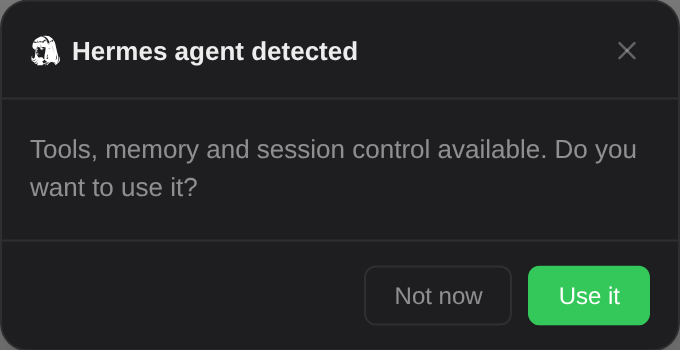
Hermes, from Nous Research, is the other route: a gateway you host, with its own memory, skills and background tasks, on this machine or another. Triplo finds a local one, reads its port and key, tests it and connects — no URL to type — then puts its 46 commands in the prompt bar.

Connecting an agent, step by step →

Triplo AI offering to connect to a Hermes gateway it found running on this machine

Found on your machine. No URL, no key to copy.

Sovereignty

Your content stays your content

Three facts shape everything else: your work lives on your disk, Triplo is not a model provider, and knowledge search runs on your machine.

01

Files, not rows in our database

Prompts, instructions, automations, conversations and knowledge bases are plain Markdown in your Documents folder. Edit them, diff them, back them up, take them with you.

02

Search that never leaves the machine

Semantic search over your Minds runs locally with a 52 MB model bundled in the app. Nothing is uploaded to be searched — and it works offline.

03

You choose the endpoint

A prompt goes to the model you picked. Pick a local one and it goes nowhere at all.

What leaves your machine

When you…It goes toCarrying
Send a prompt to a local modelNowhere—
Search a knowledge baseNowhereRuns entirely on your machine
Save a conversationNowhereLocal file only
Use the MCP serverNowhereLoopback only, token-protected
Send a prompt to a hosted modelThe endpoint you selectedThe assembled prompt and any passages it grounded on

The full table — every feature, every endpoint — is in the privacy documentation.

Running local-only

  1. 1Add Ollama or LM Studio as a Connection
  2. 2Switch off Allowance Models so a hosted one cannot be picked by accident
  3. 3Pin the local model with Magnets to every prompt that touches sensitive material

Two things we will not bury

  • Knowledge-base enrichment and image reading run on the model you selected. Pick a hosted model and that is where they go; pick a local one and they stay on your machine.
  • Audio is transcribed remotely, even when your chosen model is local. There is no local fallback for audio yet.
“Training is a mindblowing feature. This is the end of Google search engine as now the reliability lies in us and in our ability to address the right questions and prompts.”
— ciprian7, FiveTaco

Who it is for

Six people, six first moves

The feature list is long. What matters is the first thing you would actually do with it.

Copywriters & content people

House style, every time, without re-explaining it

Write the style rules once as an Instruction; every prompt inherits them.

Save the prompts you keep retyping as commands with their own hotkeys, chain a tone prompt inside a task prompt, and clone any of the 300+ built-ins that is nearly right.

InstructionsSmartPromptsHotkeys

Researchers & analysts

Answers grounded in your own material, with sources

Point a Mind at your documents; every prompt is searched against it before it is sent.

Two paragraphs travel instead of a 40-page handbook. Drop a URL or a video link and the page or transcript becomes context. Grounded answers carry their sources, so you can check instead of believe.

MindsURL & transcript ingestSources

Developers

Stop context-switching out of the editor

Select a stack trace, press the hotkey, hand it to a built-in agent that reads the repo and runs the commands.

Or keep it simple: run git log --oneline, select the output, and a saved prompt turns it into release notes grouped under Added, Changed and Fixed — no commit hashes, no internal module names.

Pi agent//selected//Custom prompts

Sales & support

Reply fast, in the right language, and log it

Draft the reply in place, then let an Automation file it.

An Automation turns the answer into an authenticated API call to your CRM, email platform or webhook — lead created, ticket filed — without leaving the message you are answering.

Automations200+ languagesClipboard tag

Consultants & solo founders

One brain per client, and it travels

A Mind per client, pinned to the prompts that need it with a Magnet.

Brand guidelines, past proposals, the contract — searched locally, attached only when relevant. The same prompts follow you to the phone.

MagnetsMobile appsKnowledge bases

Regulated & privacy-first teams

Use AI without shipping the material off the machine

Local model, allowance off, Magnets pinning it to anything confidential.

Search is always local. Serve your own knowledge to other tools over a loopback-only MCP server, token-protected, and see exactly what leaves in the table above.

Ollama / LM StudioLocal MCP serverLocal search

Version 7.0

New in 7.0

7.0

Agents behind your hotkey

Pi ships built in — approve a folder and it reads, runs and edits. Hermes connects too.

7.0

Minds rebuilt as real folders

Ingest drop zone, kept originals, readable Markdown.

7.0

Offline semantic search

Bundled model, no uploads, works offline.

7.0

A local MCP server

Other AI tools can query your knowledge base, loopback only.

7.0

A resizable window

Drag any edge — and Markdown everywhere for your whole setup.

Reviews

In their words, not ours

ResearchersContent writersCopywritersMarketersSalesSupportExecutivesHREducatorsLegal professionals

“It's like having a friendly AI assistant that pops up wherever you're working (on your phone or computer) —whether writing emails, analyzing documents or data, organizing tasks, automating your daily personal or professional activities, etc.”
— UXnerd, FiveTaco
“Instead of opening a new website, waiting for it to load, and then getting my results, I can quickly access their software while I'm working.”
— Sean7172331, FiveTaco
“for certain tasks, I can positively say that I complete them three times faster !”
— s4yf3, FiveTaco
“As a 68-year-old writer with limited technical expertise, finding user-friendly software with exceptional customer support is crucial for me. Triplo has exceeded my expectations on both counts.”
— jandrewnelson2, FiveTaco
“I have dyslexia, and this product helps! This product and Open AI helps me a lot every day when crafting email, blogs etc.”
— leif_henning, FiveTaco
“The customized Smart Prompts save me a ton of time for my SEO... Triplo saves me countless hours each month while remaining very discreet within the OS.”
— Johan_Gautreau, FiveTaco
“Thanks to the Triplo team. You enrich my life as a copywriter enormously.”
— SalihOezkurt, FiveTaco
“Triplo is a swiss army knife that can cut down trees.”
— Bukit, FiveTaco
“What's so great about Triplo is that it's a desktop application. It has access to everything on your computer. It's not stuck inside of a Chrome extension.”
— Dave Swift, video review

Objections, answered

Fair questions

I already pay for ChatGPT or Claude. Why would I need this?

Triplo AI is not a model. It is the layer that gets a model — including the ones you already pay for — into the app you are working in. Happy opening a tab and pasting? Then you do not need it.

Does it watch my screen?

No. It reads your selection or clipboard only when a prompt asks for it or you press a hotkey — no background monitoring, both switchable off, clipboard always restored.

Can I keep confidential material off the cloud entirely?

Yes — a local model via Ollama or LM Studio, pinned with Magnets, included models off. Enrichment and images then stay local too, because they run on the model you selected. One honest caveat: audio is transcribed remotely. Search is always local.

Which models can I use — and what if my favourite changes next month?

Anything speaking the OpenAI chat format — OpenAI, OpenRouter, Groq, Mistral, a corporate gateway, a local server. You add the endpoint; your keys stay on your machine. Models included with your licence — DeepSeek V4 Flash, GLM 5.3 Flash, GPT-5 Nano, Qwen3.7 Flash — need no key at all.

What is an agent, and do I need one?

No — Triplo works fully with ordinary models. When you want one, Pi is already installed: pick it, approve a folder, and a tool-using agent works behind the same hotkey, paid for by your own provider key rather than your included allowance. Pi is open source (MIT) and ships pinned inside the installer. If you separately run a Hermes gateway, Triplo detects and connects to that too.

Is there a learning curve?

Some, and reviewers say so plainly. A useful result takes five minutes; the depth rewards an afternoon.

What happens to my work if Triplo AI goes away?

Your prompts, instructions, automations, conversations and knowledge bases are Markdown files in your own Documents folder, not rows in our database. Triplo AI is built by a bootstrapped company that is profitable and funded by its customers, not by investors.

Question not answered here? Read the full documentation or email support.

⌥ Space

Put it behind your own keyboard shortcut.

Download it, press the hotkey inside whatever you are working on, and find out what that browser tab was costing you.

New to AppSumo? takes 10% off your whole cart.

Wherever you are. Always ready.
Windows · macOS · Linux · iOS · Android · ChromeOS