Models & Connections
Free models included with your licence, your own provider accounts, and models running locally on your machine — all through one selector.
Three ways to get a model
Triplo AI does not host models. It talks to whatever endpoint you point it at, using the OpenAI chat format. That gives you three routes, and you can mix all three.
| Allowance | Your own key | Local model | |
|---|---|---|---|
| Setup | None | Endpoint + API key | Install a server, then endpoint |
| Cost | Included in your licence | You pay your provider | Free, uses your hardware |
| Choice of model | A curated list | Everything your provider offers | Whatever you have downloaded |
| Prompts leave your machine | Yes | Yes | No |
| Works offline | No | No | Yes |
| Best for | Getting started; everyday work | A specific model, or existing billing | Confidential material; no connection |
Not sure? Start with an Allowance model. You can add a Connection later without changing anything else in your setup, and Magnets let individual prompts use a different model from your default.
Looking for an agent rather than a model? An agent has tools — it can run commands, read files and browse the web — and it gets its own command palette and its own cautions. Pi is already in the droplist and needs no Connection of its own; a Hermes gateway is added like any other endpoint. See Agents.
Connections — bring your own key
What it is. A saved endpoint and optional API key. Triplo asks it for a model list and then sends chat requests to it. Anything that implements the OpenAI chat API works: OpenAI, OpenRouter, Groq, Together, Mistral, a corporate gateway, a self-hosted proxy, or an agent framework that exposes an OpenAI-compatible server.
How to reach it. Action grid → LLM Models → +.
Step by step
Anything recognisable — OpenAI, Work gateway, Laptop. This name groups the models in the selector.
The base URL, without /v1/... on the end. Triplo appends /v1/models and /v1/chat/completions itself.
Sent as a bearer token. Leave it empty for endpoints that need no authentication, such as a local Ollama server.
Triplo calls /v1/models and lists what came back. You cannot save until this succeeds — deliberately, so a broken connection never sits in your list looking usable.
The models appear in the selector under your connection's name.
Common endpoints
| Provider | Endpoint URL | Key required |
|---|---|---|
| OpenAI | https://api.openai.com | Yes |
| OpenRouter | https://openrouter.ai/api | Yes |
| Groq | https://api.groq.com/openai | Yes |
| Mistral | https://api.mistral.ai | Yes |
| Ollama (local) | http://localhost:11434 | No |
| LM Studio (local) | http://localhost:1234 | No |
Example — adding OpenRouter
OpenRouter is a single account that reaches models from many vendors, which makes it a good fit for Triplo's selector.
Sign in at openrouter.ai and generate an API key.
Name OpenRouter, endpoint https://openrouter.ai/api, paste the key.
Several hundred models come back. Click Create.
With that many models, use the provider dropdown — anthropic, google, openai, x-ai — to narrow the list. One OpenRouter key puts GPT-5.6 Sol, Claude Opus 4.8, Claude Fable 5, Gemini 3.1 Pro, Grok 4.5, GLM-5.3, Kimi K3, MiniMax M3 and Qwen3.7 Max in the same selector.
Limits & gotchas
- Editing the endpoint or key clears the verified flag and the model list. You must test again before saving.
- Triplo refreshes each connection's models when the app starts. If a refresh fails, the previously cached list is used so you are not left with an empty selector.
- A connection that returns zero models fails verification with "Connected successfully but no models found." The endpoint answered, but exposes nothing — usually the wrong base URL.
- API keys are stored in Triplo's local config file on this machine. They are not synced between your devices.
Local models Paid plan
What it is. A model running on your own computer. Nothing you type ever leaves the machine — not the prompt, not the response, not the documents a Mind feeds it. This is the setup to use for confidential material, and the only one that works with no internet at all.
Setting up Ollama
Download it from ollama.com for macOS, Windows or Linux.
In a terminal: ollama pull qwen3:27b. Smaller models answer faster; larger ones answer better. See the picks below if you are not sure where to start.
Ollama listens on http://localhost:11434. Visiting that address in a browser should say it is running.
Name Ollama, endpoint http://localhost:11434, no API key. Test, then create.
Which local model
Three families are worth your disk space today. All three run through Ollama or LM Studio and all three keep everything on the machine.
| Family | Sizes worth running | Good for |
|---|---|---|
| Qwen 3 | 27B dense, or the 30B/35B MoE | The best all-rounder — strong coding and multilingual work, and the MoE builds answer quickly for their size |
| DeepSeek-R1 | 14B and 32B distills | Reasoning-heavy work where you want the chain of thought, on hardware that cannot host the full model |
| Gemma 3/4 | 26B A4B MoE, or 31B IT | Efficient general use and instruction following; the MoE build is light on memory for its quality |
As a rough guide: 16 GB of RAM comfortably runs a 14B model, 32 GB runs the 27–32B builds, and MoE models stretch further than their parameter count suggests because only part of the network runs per token.
Setting up LM Studio
Download a model in LM Studio, then open its Local Server tab and start the server. Add a Connection pointing at http://localhost:1234 with no key.
Limits & gotchas
- Local models are slower than hosted ones and their quality depends on the size you can run. Judge them on your hardware, not on benchmarks.
- Context windows are usually smaller, which means less room for Mind grounding. Triplo sizes the retrieved context automatically to fit.
- The server must be running before you open Triplo, or the model list will be empty. Refresh the selector after starting it.
- Some local servers ignore streaming. Triplo detects this and falls back to a single response — you will see the answer appear all at once instead of word by word.
- A local model still needs Triplo's licence check to pass at startup, which needs a connection once. After that you can work offline.
A separate Local LLM Settings panel exists with a Beta option to expose your local server to other devices. It is experimental. For everyday use, add your local server as an ordinary Connection as described above.
Using the model selector
Click the robot icon in the top bar. With several connections the list gets long, so it has three ways to narrow it:
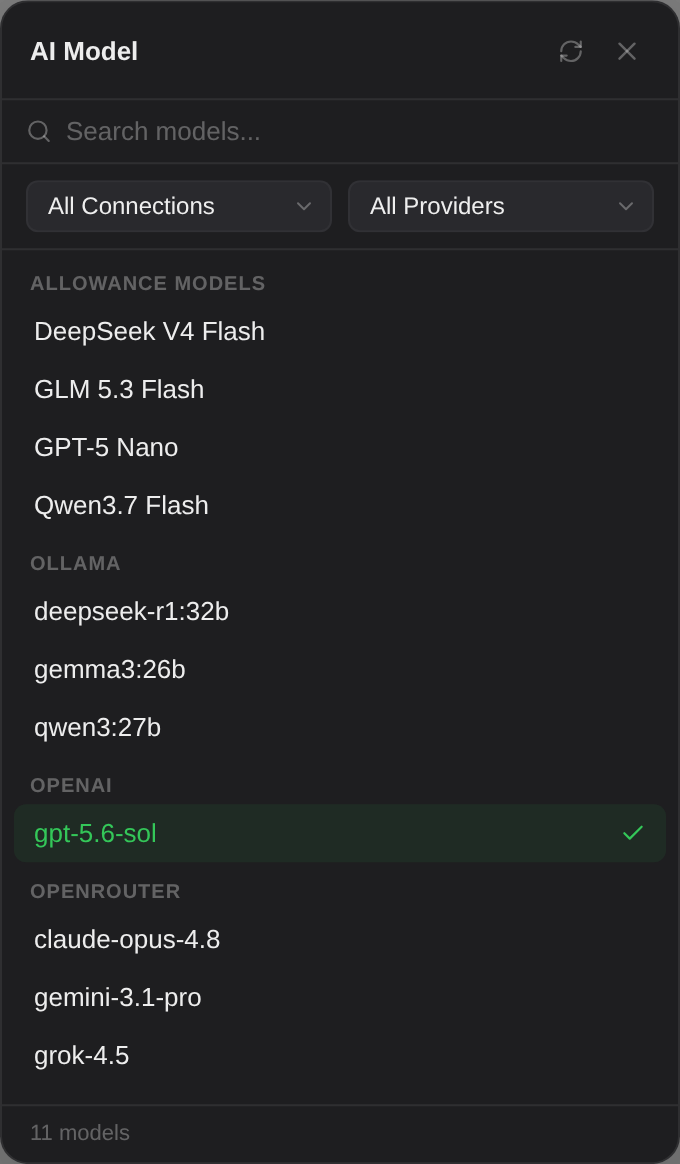
anthropic/, google/, meta-llama/. Invaluable with aggregators like OpenRouter.The refresh icon re-fetches every connection's model list. Use it after adding a model to Ollama, or when a provider has launched something new.
Your choice persists across restarts. A Magnet can temporarily override it for one prompt and then hand it back.
When something goes wrong
| Message | What it means | Fix |
|---|---|---|
| No model selected. Please select a model from the dropdown above. | No model is chosen, or the chosen one belongs to a deleted connection. | Open the selector and pick a model. |
| Authentication failed. Check your API key. | The endpoint returned 401. | Re-copy the key; check it has not expired and has credit. |
| Connected successfully but no models found. | The endpoint answered but listed nothing. | Almost always the wrong base URL — remove any /v1 suffix. |
| Failed to connect. Check the endpoint URL. | Nothing answered. | For a local server, confirm it is running. For a hosted one, check the URL and your connection. |
| API error 429 | Rate limited by the provider. | Wait, or switch to another model. |
| API error 400 mentioning context length | The prompt exceeded the model's window. | Clear the chat, shorten the input, or choose a model with a larger window. |
More in Troubleshooting.