Agents
Pi ships inside Triplo and turns your hotkey into an agent that reads, runs and edits in a folder you approve. Hermes, also new in 7.0, is detected and connected for you when a gateway is running.
A model answers. An agent acts.
Everything else in this documentation assumes the thing on the other end of your prompt is a model: you send text, it sends text back. An agent is different. It has tools. It can open a terminal, read and write files, browse the web, and remember what it did between sessions. Give it a task and it goes and does it.
Reach for one in Triplo and the product changes shape. Commands light up in the prompt bar. The agent sits behind the same global hotkey you already use, able to act on whatever you are looking at.
That combination is the point. There are three ways to reach an agent, and they are not variations on a theme:
| How you reach it | What you get | Where it lives |
|---|---|---|
A terminal and curl | An agent loop with no interface | A terminal you already had open |
| A web chat front end | A capable chat window | A browser tab you have to go to |
| Triplo | An agent behind a global hotkey, acting on whatever you are already looking at | Everywhere. It comes to you. |
Select a stack trace in your editor, press your hotkey, and hand it to something that can open a terminal and go looking. That is the whole idea.
Two agents, and you do not have to choose
| Pi | Hermes | |
|---|---|---|
| Setup | None. It ships inside Triplo | Run a gateway; Triplo finds it and connects itself |
| Where it acts | A folder on this machine that you approve | Wherever the gateway runs |
| What it is for | Reading, running and editing your own files | A long-lived agent with its own memory, skills and background tasks |
| Model | Your Connections, chosen per session | Whatever the gateway is configured with |
| How it appears | Pi Agent, always in the droplist | Offered the moment a gateway is detected — nothing to set up |
Both are new in 7.0, and they are not integrated to the same depth. Pi is built into the product: Triplo starts it, configures it from your own settings, shows every tool call as it happens, and drives it — model, thinking level, session, knowledge — from the prompt bar. Hermes is a gateway Triplo talks to over its API: it is detected and connected for you, and then it answers prompts. Triplo does not reach inside it.
Start with Pi. The rest of this page is mostly about it; Hermes follows.
Before either agent runs
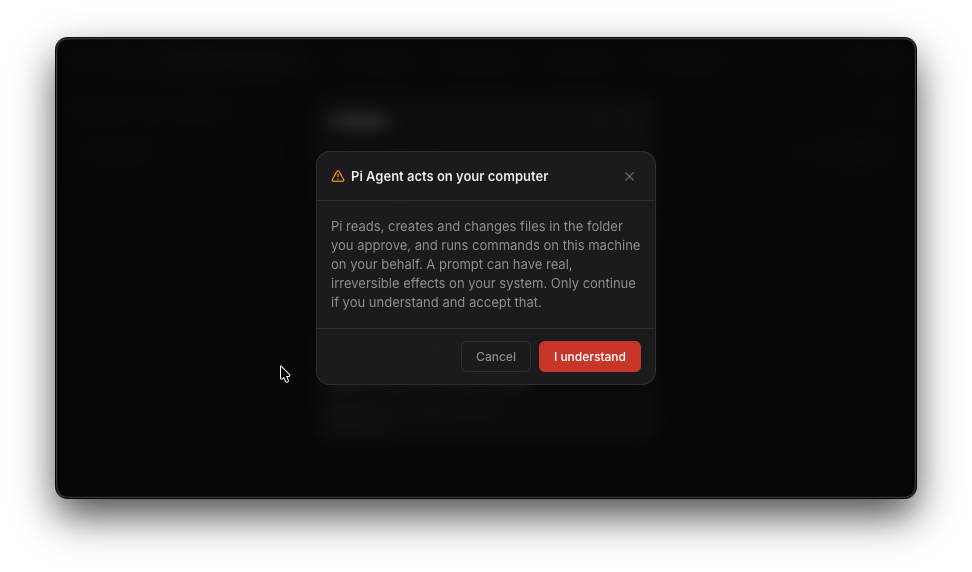
An agent acts on a real machine, so Triplo asks you to say that out loud before it will let you pick one. Choosing Pi Agent or Hermes Agent in the model droplist for the first time ends in a red alert stating what the agent can do. Until you accept it, nothing is selected and the droplist keeps the model you were on.
For Pi it is the last of three: folder, approval, then the alert. Hermes has no folder to choose and no tools for Triplo to grant, so the alert is the whole of it.
Hermes gets the same alert, worded for what it is: an agent running outside Triplo, with its own tools, that Triplo cannot narrow. If your gateway runs on another box, that box is the machine the alert is talking about.
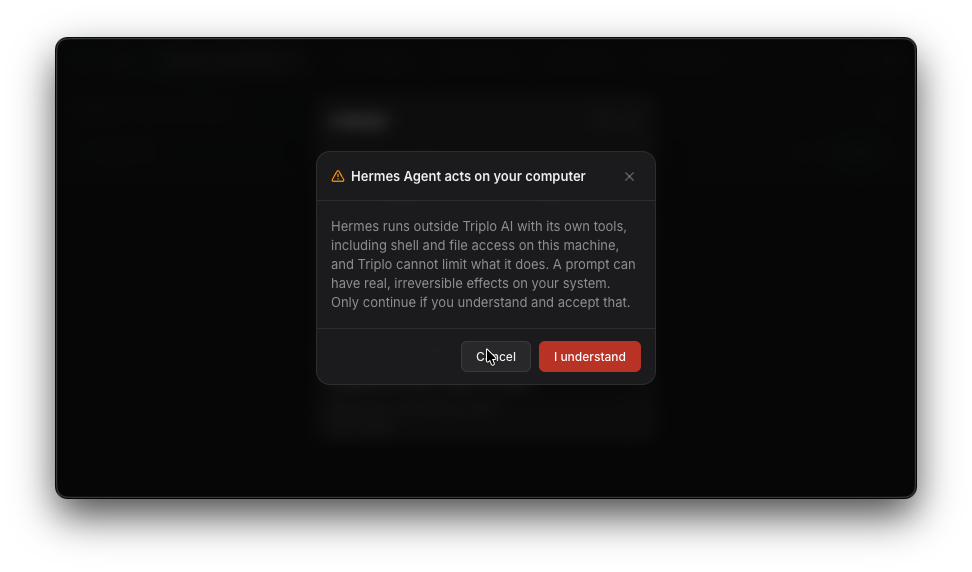
Asked once, per agent
It is an acknowledgement, not a sandbox. Accepting adds no permission and removes none. Pi still stops at every destructive operation and at the edge of the folder you approved; Hermes still answers to whatever rules it was configured with. What the alert changes is that nobody reaches an agent by accident.
Pi — the agent that ships with Triplo
Pi is built in. There is no gateway to install, no port to open, no key to paste. Pick Pi Agent in the model droplist, choose a folder, and you have an agent that reads your files, runs your commands and edits your code — behind the same global hotkey as everything else.
It runs as a child process of the app, driven over a JSON protocol. Triplo is the entire interface: Pi never opens a terminal window and never talks to you directly.
| What most coding agents ask of you | What Pi asks of you |
|---|---|
| Install a runtime, keep it updated | Nothing — it ships inside the installer, pinned per release |
| Configure providers and paste keys again | Nothing — your Connections become its model list |
| Re-teach it your writing rules | Nothing — your Instruction and language are already its system prompt |
| A terminal you have to go to | Your hotkey, wherever you are |
One thing is required: a Connection with an API key of your own. The agent runs on the keys you configured — allowance models are not available to it. See Licensing & what it costs.
Starting a session
Everything happens the moment you pick the agent. The first time, selecting Pi Agent walks you through three dialogs, and Pi only becomes the selected model once you reach the end of them.
It sits at the top of the model droplist, under Agents, above your connections. Dimmed means no provider key is configured yet — clicking it says so rather than doing nothing.
The folder dialog opens right there. Folders you have used before are listed with their status; Use another folder… opens your system's own folder picker, so there is no path to type and no folder to mistype.
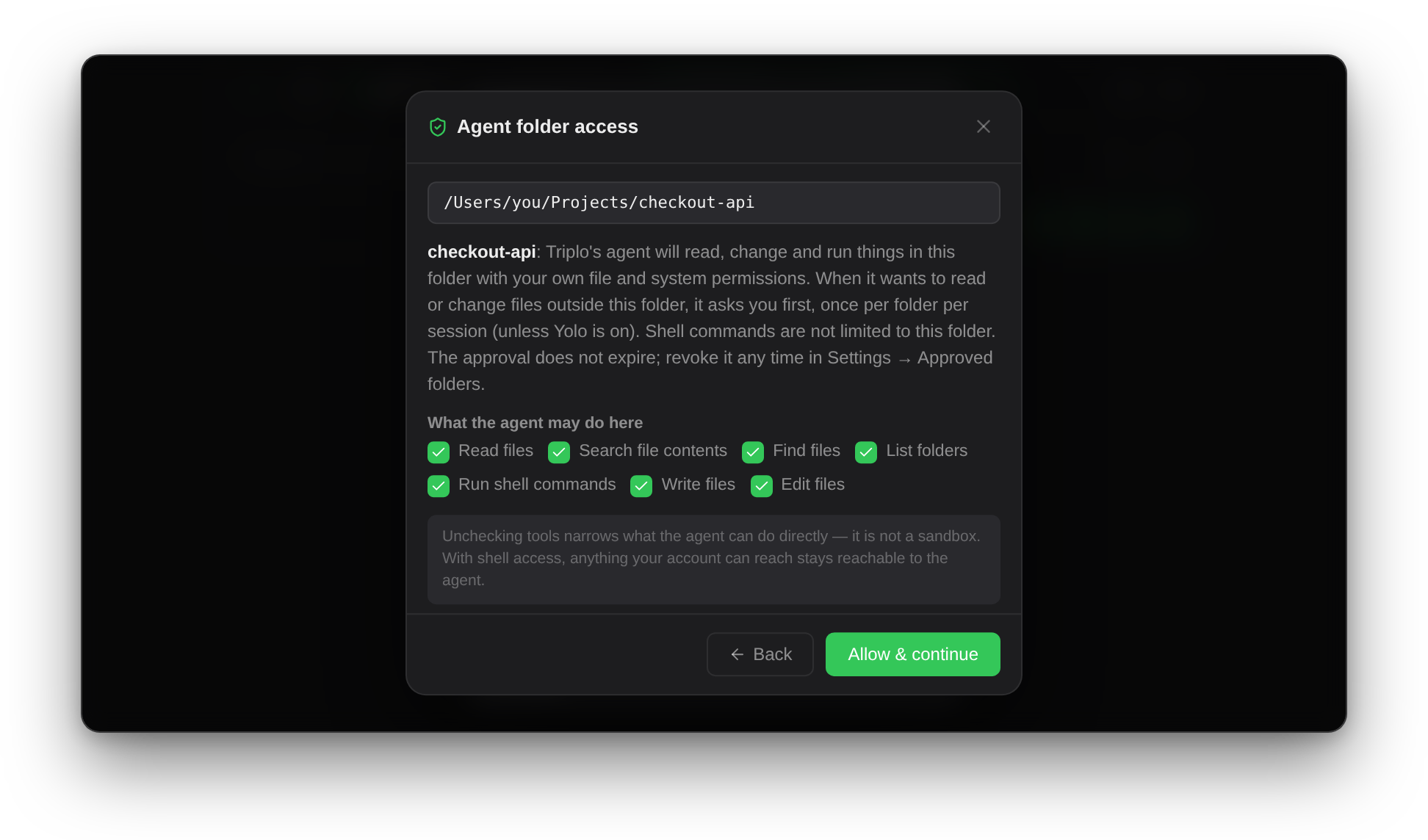
The approval names the folder and lists the tools you are granting: read files, search contents, find and list files, run shell commands, write, edit.
Last comes the red acknowledgement that an agent acts on a real machine. Accept it and Pi is now the selected model.
Every tool call appears in the transcript as it happens — the command, and what came back. Expand any of them to read the output.
That is a one-time chain. From then on Pi is selected in a single click, and a prompt starts the session on the folder you used last, with no dialog at all.
What you approve
This is the second of the three steps that stand between choosing Pi and prompting it, and the acknowledgement is the third.
Inside an approved folder, the agent can read, change and run things with your own file and system permissions. Three true things about that:
sudo, writes to credential files or dotfiles: each one stops and waits for you, unless you have armed Yolo for the session.Point it at a project folder, not at your home directory. The folder decides what the agent touches without asking, and your home directory would put almost everything inside it. It is not a wall: with shell access, a command can still reach the rest of your disk.
Inside a session
Type // in the prompt bar and the session's own commands appear, merged with Pi's:
| Command | What it does |
|---|---|
//model | Choose the model for this session. The list appears in the prompt bar — type to filter, Enter to apply. The model you pick becomes the one the next session starts on. |
//thinking | Reasoning effort, from off to max |
//new | Start over completely: stops the run in flight, clears the screen, resets the strip's counters, and puts the next prompt in a new History entry. See Starting over. |
//stop | Abort the run in flight |
//compact | Compress the conversation so a long session keeps going |
//help | The merged command list, Triplo's and Pi's together |
Your awareness tags keep working and keep their place at the top of that list, so //selected// and //clipboard// hand the agent whatever you are looking at.
Agents take their time
A model starts streaming within a second. An agent does not. Ask it to look into something and it may read four files and run a build before it says anything. The difference from a chat turn is that you can watch: each tool call lands in the transcript as it runs, with its output.
To stop, use the stop button in the prompt bar or press Esc.
Practical advice
- Give it agent-sized work. "Fix this typo" wastes it. "Find why the build broke and tell me which commit did it" is what it is for.
- You do not have to think about chat mode. An agent session is a conversation, so Triplo locks chat mode on for as long as one is open. The button in the bottom bar goes dim and stops responding, and switching back to an ordinary model restores whatever you had set before.
- Turn on the status dot so you have a signal once the window is hidden.
The run strip
A thin strip appears above the prompt bar the first time you prompt Pi, and stays for as long as the session lives. It carries what the transcript cannot: the counters for the run, and four controls that would otherwise cost you a command each.

provider/model — the friendly name of the connection you picked, not an internal id. Before the first report of a session arrives it shows your remembered //model choice, so it is never blank. Click it to switch model: that types //model into the prompt bar and opens the list, exactly as if you had typed it yourself. It is the one item that stretches, so a long name never pushes the counters around.Yolo
Pi has no sandbox of its own — its tools run with your account's permissions, which is the plain statement in Pi's own security notes. The confirmations you get before a recursive delete, a sudo, a raw disk write, a change to a credential file or a dotfile, or any read or change outside the approved folder are Triplo's, added on top. Yolo turns them off.
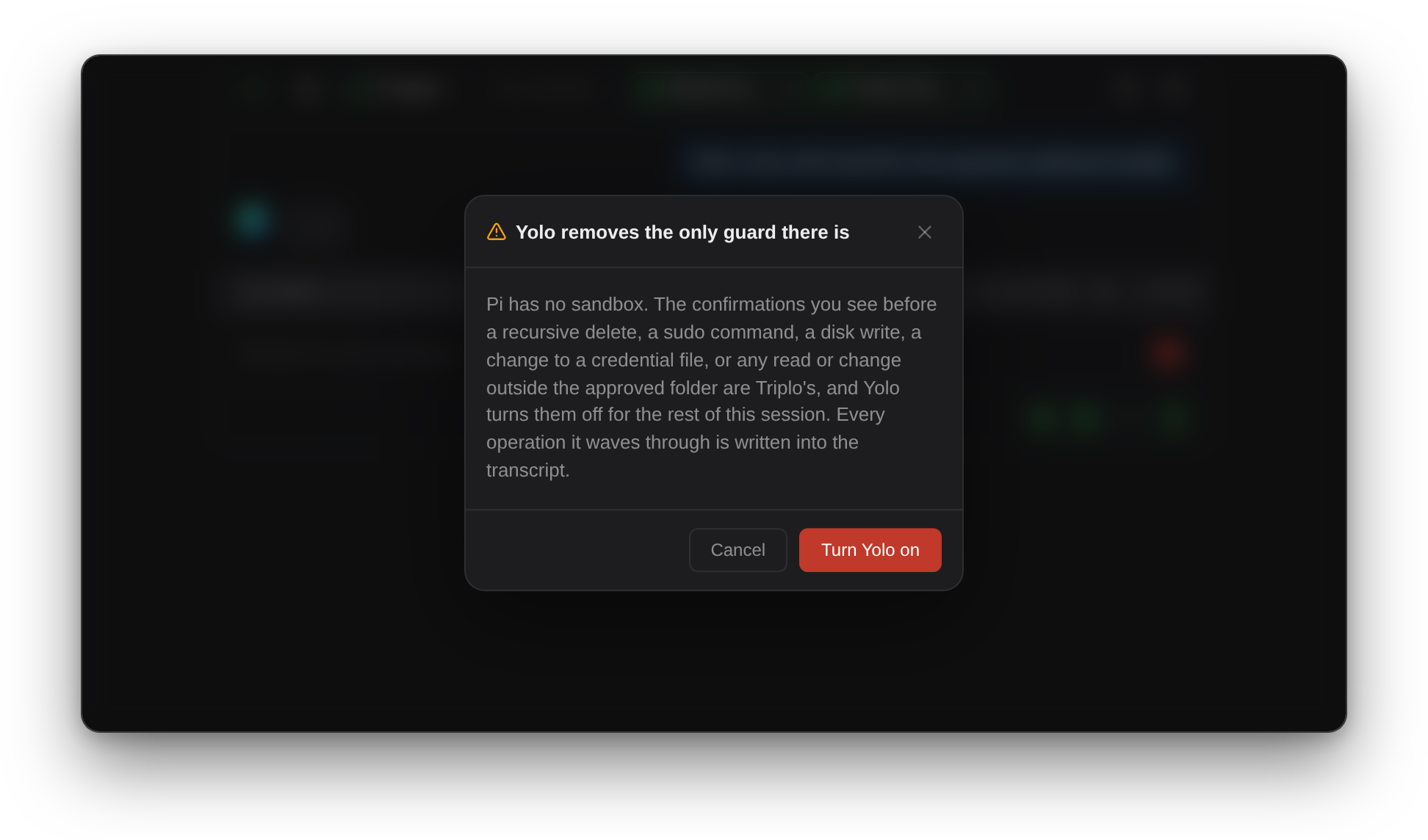
//new, a folder switch, picking another model, or closing Triplo all clear it. There is no setting for it.Use it inside a folder you could lose. Yolo is for a scratch repository, a checkout you can re-clone, a sandbox VM. It is not for your home directory, and it does not become safe because the task looks small.
Capping a run
Pi marks its own turns but caps nothing, so Triplo counts them for the session and gives you somewhere to stop. Click the counter, set a number, and the run that crosses it ends there. The number is remembered for the next session; the count itself restarts with each session.
What makes it useful rather than a blunt cut-off is what happens before the end. With 10 and again with 5 turns left, Triplo tells the agent, in the middle of its own turn, how much budget is left and to prioritise and prepare to summarise. Both warnings appear in the transcript too, so you can see what it was told. Leave the cap empty and nothing is counted against you.
Starting over
//new ends the session and begins a clean one, in the same folder. Everything that belonged to the old session goes with it:
- A run still going is stopped first, so nothing from it can arrive in the new view a few seconds later.
- The screen is cleared. The confirmation is the only thing left on it.
- The counters reset. Turns, tokens, cache and the budget warnings all re-seed at zero, on the same folder.
- The next prompt opens a new History entry. The conversation you just left stays in History, complete and untouched.
Switching folder from the strip does the same thing, for the same reason: Pi works inside the folder its process started in, so a different folder is necessarily a different session — and a different History entry.
Sessions in History
An agent session is saved like any other conversation, and it is saved whole: your prompt, the answer, every tool call and every note, written at the end of each run. A run that failed is saved too, because a failed run still produced something worth reading back.
//new, a folder switch or clearing the screen starts a new entry rather than writing over the one before it.Agent conversations saved by an earlier build keep whatever they were written with, including the stray undefined blocks where a tool call should be. They are read as they are, never rewritten. Only new saves are clean.
Where these files live, and why they are not in ~/Documents/Triplo AI, is in Configuration and data. If a save is ever refused, the reason appears in the transcript and in the log for the day — the real reason from the app, not a guess.
Minds, inside the agent
The agent gets two knowledge tools, one to search and one to read a found entry in full, and it sees exactly one knowledge base: the Mind active in the UI. Switch Minds mid-session and the agent follows on its next search or read.
It cannot list your other Minds and cannot reach them. With no Mind selected the tools are not there at all — the agent works without knowledge rather than guessing at which base to use. If the knowledge server is unreachable, it says so once and carries on.
Connecting other MCP servers
Beyond your Minds, the agent can use any MCP server you point it at — GitHub, a database, an issue tracker, your own. There is no UI for this on purpose: it is a file you edit.
Triplo creates the file once, with a disabled example of each transport, and never rewrites it. Your entries are safe.
| Field | Applies to | Meaning |
|---|---|---|
id | both | Names the server and prefixes its tools. Required |
enabled | both | Only true is loaded |
transport | both | stdio or http. Defaults to http when url is set |
command, args, cwd, env | stdio | The process to run and what it inherits |
url, headers | http | Endpoint and authorization |
timeoutMs | both | Per-request budget, handshake included. Default 15000 |
Values expand $VAR and ${VAR} from the environment, so tokens stay out of the file. A server's tools reach the agent as <id>__<toolName>, so two servers cannot collide and neither can shadow a built-in tool. Changes apply on the next session.
Enabling a server in this file is the consent — its tools are not gated by the folder's tool list. Add servers you trust. A server that will not start, will not authenticate, or does not answer in time is skipped, and the session runs without it.
Your configuration becomes the agent's
There is no second setup to keep in sync. When a session starts, Triplo writes the agent's configuration from what you already have:
//model only ever offers models you can pay for. Keys travel through the environment, never onto disk in plain text.Change any of them and the next session picks it up. The agent engine itself updates with Triplo, not on its own: it is pinned per release and ships inside the installer — deliberate, for something that runs shell commands.
Privacy. Agent session transcripts can contain the contents of files the agent read, so they are stored in the app's private data directory — never in ~/Documents/Triplo AI. Agent conversations appear in History like any other and stay local: no cross-device sync.
Licensing & what it costs
Pi is open source, and it is not ours
The agent engine is @earendil-works/pi-coding-agent by Mario Zechner, released under the MIT licence. Triplo bundles it, pins it to a specific version per release, and ships it inside the installer together with its own Node runtime. Nothing is downloaded or updated behind your back.
MIT means you are free to use it commercially, including through Triplo. The copyright notice and licence text travel with the copy inside the app, as that licence requires. Triplo does not add terms to it, and does not charge for it.
What you pay for, and to whom
A dedicated key for agent work, with a spend cap at the provider, is worth the two minutes it takes. Agent loops are the one place in Triplo where a single prompt can run for minutes and read a lot of tokens.
Hermes — the agent you already run
Hermes, from Nous Research, is the other route, and a different proposition from Pi. It is a gateway you host: it keeps its own memory across sessions, carries its own skills, runs background tasks, and can live on a machine that is not this one. Triplo detects it, names it, and ships a command library for it.
Everything below is Hermes. If you only wanted the built-in agent, you are already done.
Hermes — what you need first
Triplo connects to a Hermes agent that is already running. It does not install or host one. You need a Hermes gateway with its API server switched on — on this machine, or on another one you can reach.
That is configured in Hermes, in ~/.hermes/.env:
Two more lines matter depending on where the gateway runs:
127.0.0.1 by default, which means only the machine it runs on can talk to it. To reach it across a private network, set API_SERVER_HOST=0.0.0.0.API_SERVER_CORS_ORIGINS=* settles it.Restart the gateway after editing .env. Triplo reads the file but Hermes only reads it at startup.
Connecting
If Hermes runs on this machine — let Triplo find it
Triplo looks for a local Hermes gateway on its own. When it finds one, it offers to connect:
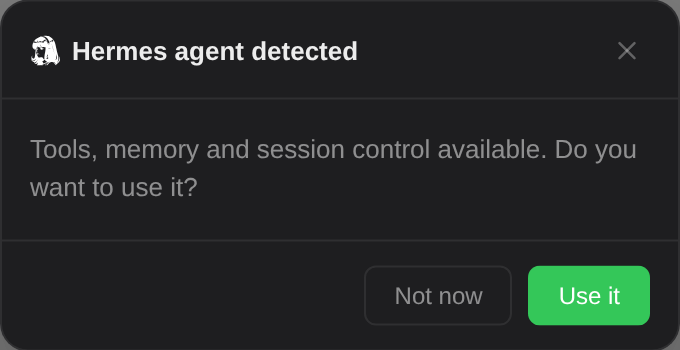
Click Use it and you are connected — no URL to type, no key to copy. Triplo reads the port and key straight out of ~/.hermes/.env, confirms the gateway is answering, and saves the connection with the agent's model already selected.
The same offer also appears as a banner inside the model selector, so if you dismissed the first one you have a second chance to accept it there.
What detection actually checks
~/.hermes/.env in your home folder, on the machine running Triplo.API_SERVER_ENABLED is false.http://127.0.0.1:<API_SERVER_PORT>/v1/models, using API_SERVER_KEY as the bearer token. Port 8642 if none is set. It gives up after a second and a half, so a gateway that is down costs you nothing.hermes-agent if the gateway advertises one, otherwise the first model it returns.Detection is local only. It reads a file on this machine and probes 127.0.0.1, so a gateway running on another box is not found.
If the gateway runs somewhere else
Detection reads a file on this machine and probes 127.0.0.1, so a gateway on another box is never found. There is no separate setup screen for one: in 7.0 the supported path is a gateway running where Triplo runs.
Agents take their time
This is the one thing worth knowing before your first real task, because otherwise it looks like a bug.
A model starts streaming words back within a second. An agent does not. Ask it to look into something and it may search the web, read four files and run a build before it says anything at all. Triplo sees one response, at the end. For ninety seconds there is nothing, and then there is everything.
Nothing is broken. The agent is working.
Interrupting
Two ways, both new and both worth knowing here:
Those stop Triplo waiting. With Pi they stop the agent too: the session aborts what it is running, and //stop does the same from the prompt bar. With a Hermes gateway they only stop Triplo listening — work already started keeps running on the gateway, and you stop it there.
Practical advice
- Give an agent agent-sized work. "Fix this typo" wastes it. "Find why the build broke and tell me which commit did it" is what it is for.
- Turn on the status dot, set to Hide on Idle. It is the only signal you get that something is still running once the window is hidden.
- Keep chat mode on. Agent work is iterative; a session it can build on is worth the tokens.
What you are actually handing over
Worth stating plainly, once. It applies to both agents, but not identically: Pi acts on this machine, in the folder you approved. Hermes acts on the machine running the gateway.
This is an agent, not a model. Anything you send it can run commands, read and write files, browse the web, and remember it between sessions. With Pi that happens here, with your permissions, inside the folder you approved. With Hermes it happens on the machine running the gateway, not on this one — so only connect to gateways you control.
That last distinction is the one people get wrong with Hermes. When the gateway runs on another box, the agent's terminal is that box's terminal. Your files are safe; the gateway machine's files are not. If those are the same machine, they are the same risk.
With Pi there is no distinction to get wrong: it is always this machine, always your own permissions, always inside the folder you approved — which is why the approval is the thing to be deliberate about.
http:// is unencrypted127.0.0.1 or inside a WireGuard network such as Tailscale. Never across the open internet.//approve / //deny are how you answer. //yolo removes that gate entirely. Pi's equivalent is the per-operation confirmation described under What you approve, and Yolo switches it off for one session.Combining an agent with the rest of Triplo
Once an agent is selected, everything you have already built points at it — Instructions, Minds, Magnets and SmartPrompts all apply, for Pi and for Hermes alike.
Pin an agent to one prompt
You rarely want an agent for everything — it is slower and more powerful than most tasks need. A Magnet solves this: pin the agent as the Model on a single SmartPrompt, and that prompt alone runs against it while everything else keeps using your usual model. Triplo switches for that prompt and switches back after.
Example — an investigation key
Select a stack trace anywhere, press Cmd+Shift+D, and an agent that can read the repository goes and looks. Note that background hotkey prompts paste their result at your cursor — for agent work you usually want the answer on screen instead, so run these from the window rather than as a background hotkey.
Instructions and Minds still apply
An ordinary prompt to an agent is assembled exactly like any other: language directive, Instruction, Mind context, then your text. So an Instruction telling the agent about your stack, or a Mind holding your architecture notes, works as you would expect.
The bypass is narrower than it looks. A prompt is treated as a raw command only when it begins with //; a // anywhere else in the line is ordinary text and changes nothing. And the two awareness tags are substituted before that test — by the time the prompt is sent, //selected// has already become the captured text — so a prompt that starts with //selected// is a normal, fully assembled prompt, not a pass-through.
Limits & gotchas
Pi
- One folder at a time. A session is bound to the folder it started in. To work elsewhere, start a new session there.
- The tool list is not a sandbox. Shell access reaches everything your account reaches, whatever else you unchecked.
- The folder edge stops file tools, not the shell. Reading or changing files outside the folder asks first; a shell command that does the same does not.
- A capped run stops mid-task. The agent is warned at 10 and 5 turns left, but if it runs past them the run ends where the cap falls.
- Allowance models never appear in
//model. Agent runs need a provider key of your own. - One Mind, the active one. The agent cannot see or list your other Minds.
- MCP changes need a new session.
mcp-servers.jsonis read at startup. - The engine is pinned per release. It updates when Triplo updates, and not on its own.
Hermes
- Detection is local only — it reads
~/.hermes/.envand probes127.0.0.1. A gateway on another machine is not found. - The offer appears once. Dismissing it is permanent for that install.
- No intermediate progress. Tool calls are not streamed back — you see silence, then the finished answer.
- The commands do not control the gateway. They are listed as a reference; the API connection Triplo uses does not carry session control.
- Pass-through responses are not saved to history.
- Port 8642 is the Hermes default. Some older notes say 8643 — that is wrong and will land you on a dead port.
- The agent's own token usage is its business. Triplo's allowance counter tracks Triplo's models, not what your agent spends on its own model.
When it does not work
| Symptom | Likely cause | Fix |
|---|---|---|
| Pi Agent is greyed out in the droplist | No Connection has an API key | Add a key to any connection in Settings → LLM Models. The allowance alone does not qualify. |
| The agent says a folder is not approved | The approval was revoked, or the folder moved | Send a prompt and approve it again when the picker appears. |
//model lists nothing | No session is live yet | It starts one for you; if the list is still empty, check that a connection has models configured. |
| An MCP server's tools never appear | enabled is not true, or the server failed to start | Check mcp-servers.json, then start a new session. Failures are skipped silently by design. |
| Never offered the detected gateway | Gateway not running, API server off, or the offer was dismissed before | Check API_SERVER_ENABLED=true and that the gateway is up, then restart Triplo. |
| Detected on the wrong port | API_SERVER_PORT changed since the gateway started | Restart the gateway so it reads the current .env. |
| Authentication failed. Check your API key. | Key mismatch | Re-copy API_SERVER_KEY from the gateway's .env. |
| Failed to connect on a gateway you know is up | The gateway is refusing Triplo's origin, or is bound to localhost only | Set API_SERVER_CORS_ORIGINS=*, and API_SERVER_HOST=0.0.0.0 for remote access. Restart it. |
| Connected successfully but no models found | The URL includes /v1 or a full path | Trim it to the base URL — host and port only. |
| Nothing happens for a minute or more | The agent is running tools | Expected. Watch the status dot; stop with the stop button or Esc. |
| A Hermes command does nothing | Expected in 7.0 — the commands are a reference, not a control surface | Use the gateway directly for session control, or the built-in agent for control from Triplo. |
More general problems are in Troubleshooting.