MCP Server
Let Claude Code, Cowork and any other MCP client search your Minds directly, over a local token-protected endpoint.
Triplo as a knowledge server
Everywhere else in this documentation, Triplo is the thing asking a model. Here it is the other way round: Triplo runs a small server on your machine, and other AI tools ask it.
The Model Context Protocol (MCP) is the standard those tools use to reach external data. Switch the server on and any MCP client can list your Minds, inspect their structure, search them, read their entries in full, and add notes to them.
What that buys you: the knowledge base you built for Triplo stops being Triplo's alone. Your coding agent can consult your architecture notes. Your writing assistant can check your style guide. You maintain one knowledge base and every AI tool on your machine reads from it.
Do not confuse this with a Connection. A Connection is where Triplo gets answers from. The MCP server is where other tools get your knowledge from. Opposite directions.
Turning it on
How to reach it. Settings → Preferences → MCP Server. Off by default — nothing is exposed until you ask for it.
The server starts immediately. An info icon appears beside the toggle.
The connection panel opens, showing the running state, the endpoint, the access token and the available tools.
Each has a copy button. The token is masked until you click the eye.
See Connecting a client below.
What the panel tells you
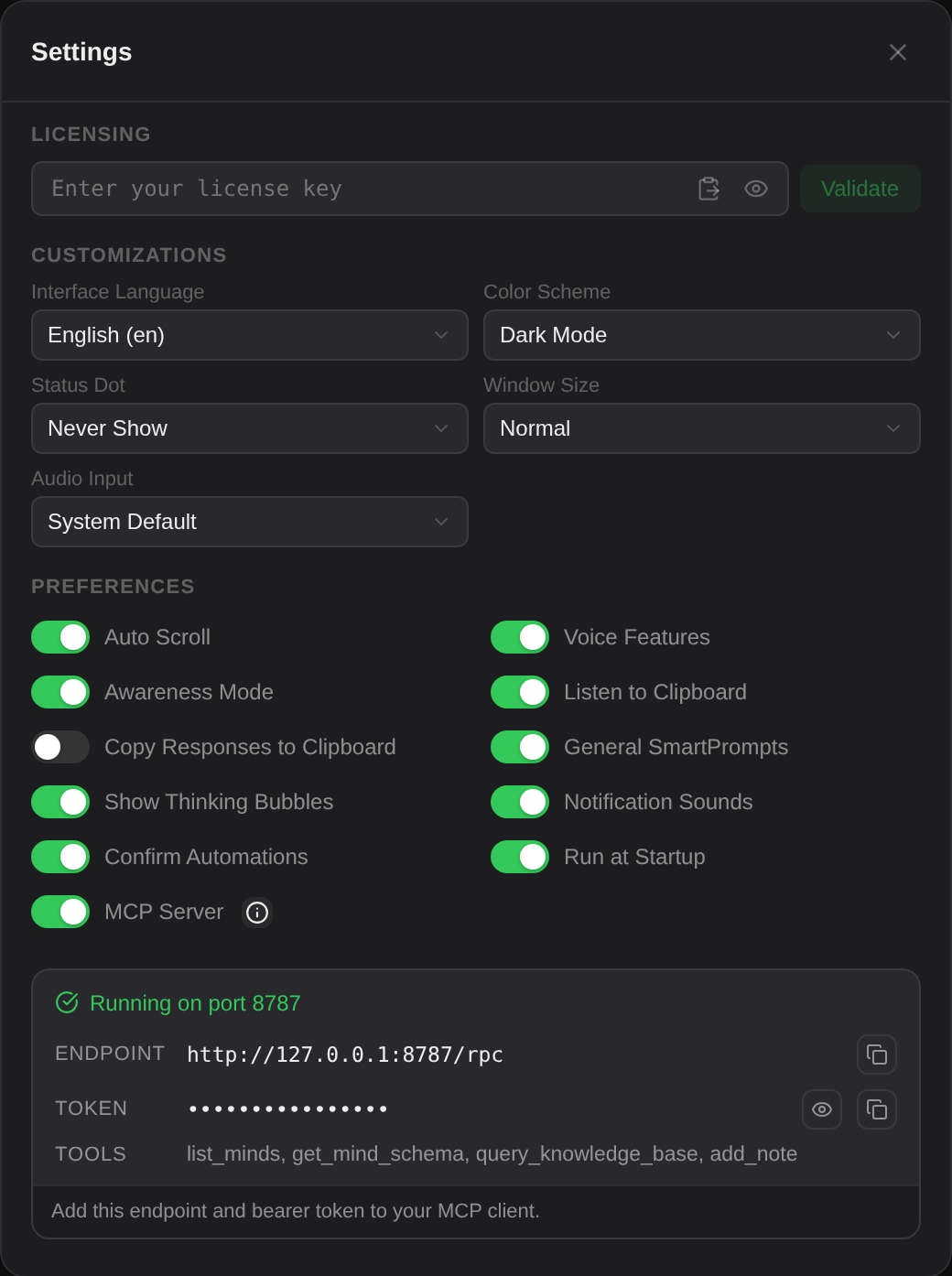
/rpc.The security model
Three properties worth knowing before you switch it on:
127.0.0.1. It is not reachable from your network, your router or the internet — only from programs running on this computer. There is no setting that changes this.401 Unauthorized and nothing else. Other local programs cannot read your Minds by guessing the port.Treat the token like a password: it is the only thing standing between a local process and your knowledge base. Do not commit it to a repository or paste it into a shared document.
Connecting a client
The server speaks JSON-RPC over HTTP POST to /rpc, with the token as a bearer header. Any MCP client that supports an HTTP transport can use it.
Generic configuration
Substitute the port and token shown in your own info panel.
Checking it by hand
Before configuring a client, confirm the server answers:
A JSON list of five tools means everything is working. {"error":"Unauthorized"} means the token is wrong. No response at all means the server is not running, or is on a different port.
Telling the client how to use it
Most agents work better with a note in their instructions about what the tools are for. Something like:
The five tools
list_minds
Lists every Mind with its id, name and entry count. The natural first call — it tells the client what is available and which id to use for everything else.
Arguments: none.
get_mind_schema
Returns a Mind's structure: how many entries, the dominant tags, the entity types present, and a summary of its index. An agent that reads this before searching writes much better queries, because it knows what vocabulary the Mind actually uses.
| Argument | Type | Notes |
|---|---|---|
mind_id | string | Optional. Defaults to the Mind currently selected in Triplo. |
query_knowledge_base
The main one. Searches a Mind and returns matching entries with their summary, path and relevance. To read an entry in full, pass its path to read_mind_entry. Uses the same semantic search the app uses — meaning-based, running locally, with a keyword fallback.
| Argument | Type | Notes |
|---|---|---|
query | string | Required. What to search for. |
mind_id | string | Optional. Defaults to the selected Mind. |
limit | number | Optional. Maximum results. |
read_mind_entry
Returns the full text of one entry, using the path from a query_knowledge_base result. Only files inside that Mind's vault can be read. Long entries come back in pages: the response carries truncated and next_offset, and you call again with that offset for the rest.
| Argument | Type | Notes |
|---|---|---|
path | string | Required. The entry path exactly as returned by the search. |
mind_id | string | Optional. Defaults to the selected Mind. |
offset | number | Optional. Character position to start from. Default 0. |
max_chars | number | Optional. Characters per page. Default 20,000, maximum 60,000. |
add_note
Writes a note into a Mind. It enters the normal ingestion pipeline — indexed immediately, enriched in the background — and is then searchable from Triplo and from every other client.
| Argument | Type | Notes |
|---|---|---|
content | string | Required. The note body. |
title | string | Optional. Inferred from the content if omitted. |
mind_id | string | Optional. Defaults to the selected Mind. |
add_note lets a connected agent write into your knowledge base. Notes it adds are indistinguishable from your own once enriched. If you would rather keep a Mind read-only, tell your agent not to use it — and review new USER_-prefixed files in the vault from time to time.
What to use it for
A coding agent that knows your architecture
Build a Mind from your design documents, ADRs and internal conventions. Your coding agent then answers "how do we handle retries here?" from your actual decisions rather than from generic practice.
A writing assistant that knows your voice
A Mind of approved copy, brand guidelines and past campaigns. Any tool with access writes in your register instead of a generic one.
Shared memory across tools
With add_note, an agent can record what it decided and why. A different tool tomorrow reads that note before starting. The Mind becomes an accumulating record rather than a static archive.
add_note and was enriched like your own material.Answering from documents you cannot upload
Because search runs locally, an agent can consult confidential material without that material being uploaded anywhere — only the retrieved passages travel, and only to the model that agent is using.
Limits & gotchas
- Triplo AI must be running. Quit the app and the server stops. Enable Run at Startup if clients depend on it.
- The port can move. If 8787 was taken at launch, the server is elsewhere. Re-check the info panel after a restart if a client stops connecting.
- Local only. There is no way to expose it to another machine. That is a deliberate limit, not an oversight.
- The token does not change on its own. It is generated once and reused. There is no rotate button in 7.0.
- Minds only. The server exposes knowledge bases — not your SmartPrompts, Instructions, Automations or history.
- The default Mind matters. Calls that omit
mind_iduse whichever Mind is selected in Triplo, so a client can appear to search "the wrong" knowledge base if you switched selection. Have clients passmind_idexplicitly. - Clients that only speak stdio need a bridge process to reach an HTTP endpoint; the server does not offer a stdio transport.